Every digital image you see starts with RGB and every printed label on a package owes its colors to CMYK. These two systems carry enormous weight behind the scenes, with the RGB model offering a color gamut that is significantly larger than CMYK and enabling millions of color variations on digital screens. Most people assume a beautiful design will look the same from monitor to printed page. The surprise is how easily that vision gets lost in translation. Getting the difference between CMYK and RGB right is not just trivia for designers. It could mean the difference between a brand landing perfectly or facing costly reprints.
Table of Contents
- How CMYK And RGB Color Models Work
- Why Color Models Matter In Industrial Printing
- Best Practices For Choosing CMYK Vs RGB
- Practical Impact On Packaging And Materials
Quick Summary
| Takeaway | Explanation |
|---|---|
| CMYK is essential for printing accuracy. | CMYK’s subtractive model absorbs light, ideal for reproducing accurate colors in physical materials. |
| RGB offers a wider color range for digital media. | The additive RGB system creates vibrant colors on digital screens, utilizing red, green, and blue light. |
| Understand conversion between color models. | Conversion from RGB to CMYK is vital; not all colors in RGB can be matched in CMYK accurately. |
| Strategic color management mitigates printing errors. | Advanced color management systems are critical for maintaining color integrity across various printing techniques. |
| Consider industry-specific color requirements. | Different sectors have unique needs; packaging demands CMYK for precision while digital marketing can use RGB. |
How CMYK and RGB Color Models Work
Understanding the fundamental differences between CMYK and RGB color models is crucial for professionals in printing and digital design. These two color systems operate on distinctly different principles, impacting how colors are perceived and reproduced across various mediums.
The Fundamentals of RGB Color Model
The RGB color model is an additive color system used primarily in digital displays and electronic devices. Learn more about digital color reproduction, which reveals how this model functions. In the RGB model, colors are created by combining different intensities of red, green, and blue light. When these primary colors are mixed at full intensity, they produce white, while the absence of all colors results in black.
Digital screens like computer monitors, smartphones, and televisions utilize the RGB model. Each pixel contains tiny red, green, and blue light-emitting elements that can be adjusted to generate millions of color variations. According to research from Harvard University, the RGB model offers a significantly larger color gamut compared to CMYK, allowing for more vibrant and nuanced color representations.
The Subtractive Nature of CMYK
In contrast to RGB, the CMYK color model is a subtractive color system designed specifically for printing processes. This model uses cyan, magenta, yellow, and black inks to create colors by absorbing (subtracting) specific wavelengths of light. When these ink colors are combined in various proportions, they produce the visual spectrum seen in printed materials.
Printers use the CMYK model because physical ink behaves differently from digital light. By layering these four ink colors, printing professionals can reproduce a wide range of colors on paper, textiles, and other surfaces. Understanding color modes reveals that the CMYK model has inherent limitations compared to RGB, primarily due to the physical constraints of ink and printing technologies.
The key difference lies in how these models generate color. RGB creates color by adding light, making it ideal for screens, while CMYK produces color by subtracting light, making it perfect for physical printing. This fundamental distinction means that colors designed in RGB might look dramatically different when printed using CMYK, necessitating careful color management for designers and print professionals.
For industrial printing applications, understanding these color models is not just technical knowledge—it is a critical skill. Graphic designers, packaging specialists, and print production managers must consistently translate colors between these models to ensure accurate color reproduction. Misunderstandings or improper conversions can lead to significant color discrepancies, potentially compromising the visual quality of printed materials.
Here is a comparison table summarizing the key differences between the RGB and CMYK color models for quick reference.
| Feature | RGB Model | CMYK Model |
|---|---|---|
| Process Type | Additive (adds light) | Subtractive (absorbs light) |
| Used For | Digital screens, electronic displays | Printing on paper, packaging, textiles |
| Primary Colors | Red, Green, Blue | Cyan, Magenta, Yellow, Black |
| Color Gamut | Larger (more vibrant, millions of colors) | Smaller (limited by physical inks) |
| How Color is Produced | By emitting light | By layering/absorbing ink |
| Produces White/Black | Full intensity = White; absence = Black | All colors = Near Black; absence = White (paper) |
| Suitability | Best for web/digital design | Best for physical print production |
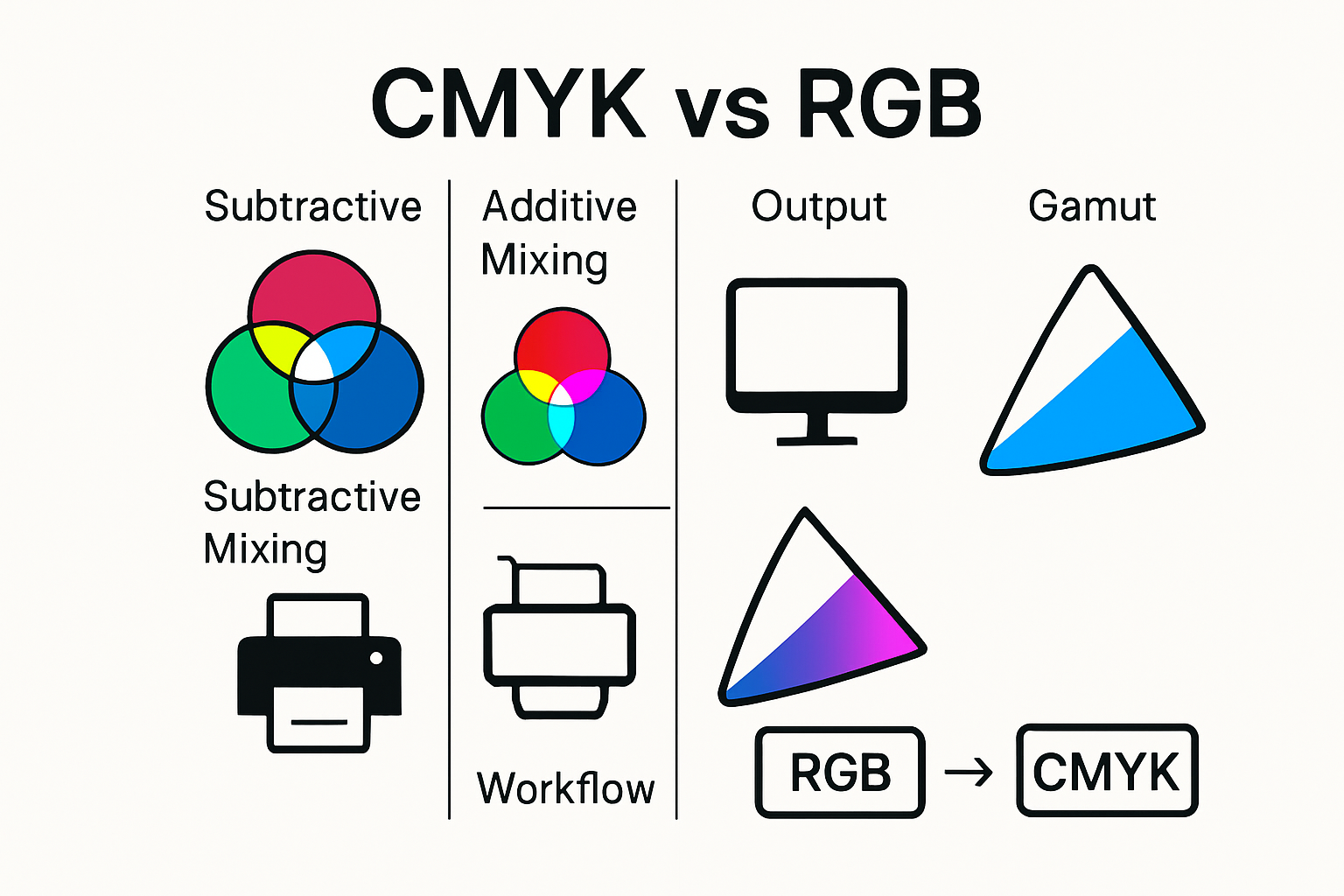
By comprehending how CMYK and RGB color models work, professionals can make informed decisions about color selection, design strategies, and print production techniques. Whether creating digital graphics or preparing files for industrial printing, mastering these color systems ensures consistent and high-quality visual communication.
Why Color Models Matter in Industrial Printing
In the intricate world of industrial printing, color models are far more than theoretical concepts—they are critical tools that determine the quality, consistency, and economic viability of printed materials. Understanding the nuanced role of CMYK and RGB color models is essential for professionals across various industries, from packaging design to large-scale commercial printing.
Precision and Color Reproduction Accuracy
Color accuracy is paramount in industrial printing, where even slight variations can significantly impact brand perception and product quality. According to research from the European Color Initiative, standardized color management is crucial for maintaining consistent color reproduction across different printing processes and devices.
Industrial printing requires meticulous color translation between digital and print environments. When designers create graphics in RGB, they must carefully convert these to CMYK to ensure the final printed product matches the original design intent. This conversion process is complex, as the RGB color gamut is significantly larger than CMYK, meaning not all digital colors can be precisely reproduced in print.
Economic and Brand Implications
The economic stakes of color accuracy are substantial. Incorrect color reproduction can lead to costly reprints, brand inconsistency, and potential loss of client trust. Wikipedia’s analysis of color models highlights that professional printing operations invest heavily in color management technologies to minimize these risks.
For industries like packaging, automotive, and electronics, color precision is not just aesthetic—it’s a critical quality control parameter. A pharmaceutical label, an automotive paint finish, or an electronic device’s color must match exact specifications. Explore our guide on production time optimization to understand how precise color management can streamline manufacturing processes.
Technological Challenges and Solutions
Modern industrial printing faces significant challenges in color reproduction. Digital displays use RGB, which creates colors by emitting light, while print processes use CMYK, which creates colors by absorbing light. This fundamental difference means that colors appearing vibrant on a screen may look muted or entirely different when printed.
Professional printing operations combat these challenges through advanced color management systems. These systems use ICC (International Color Consortium) profiles to create precise color translations, ensuring that a design’s original color intent is maintained across different printing technologies and substrates.
The implications extend beyond aesthetics. In sectors like medical device manufacturing, automotive design, and high-end packaging, color accuracy can reflect product quality, brand perception, and even regulatory compliance. A mismatched color in a medical device packaging or an automotive component could suggest quality control issues.
For industrial printing professionals, mastering color models is not optional—it’s a fundamental skill. It requires understanding the technical limitations of color reproduction, investing in advanced color management technologies, and maintaining a rigorous approach to color translation and verification.
As digital design continues to evolve and printing technologies become more sophisticated, the ability to navigate the complex landscape of color models will remain a critical competency. Professionals who can effectively bridge the gap between digital design and physical printing will be invaluable in industries that demand precision, consistency, and visual excellence.
Best Practices for Choosing CMYK vs RGB
Navigating the complexities of color models requires strategic decision making for professionals in industrial printing, graphic design, and digital media. Selecting the appropriate color model is not merely a technical choice but a critical workflow decision that impacts project quality, cost efficiency, and visual outcomes.
Digital Design and Initial Color Selection
When beginning a design project, the initial color model selection depends entirely on the final output medium. California State University’s printing guidelines recommend starting digital designs in RGB for screen-based projects and transitioning to CMYK for print materials. This approach ensures designers maintain maximum color flexibility during the creative process.
Professional designers typically work in RGB because digital design software provides more extensive color manipulation tools. RGB offers a broader color spectrum, allowing for nuanced color exploration and creative expression. However, understanding the limitations of color translation becomes crucial when preparing designs for print production.
Conversion and Color Management Strategies
Converting between RGB and CMYK requires careful attention to preserve color integrity. Iowa State University’s Printing Services emphasizes the importance of strategic color conversion to maintain design intent. Key strategies include:
- Early Conversion: Transform designs to CMYK early in the production process to preview potential color shifts
- Soft Proofing: Utilize software color management tools to simulate how colors will appear in print
- Color Profile Selection: Choose appropriate ICC color profiles that match specific printing technologies
Professional color management systems help mitigate unexpected color variations. Read our comprehensive guide on optimizing print production to understand advanced color translation techniques that minimize quality discrepancies.
Below is a table summarizing best practices for managing color model selection and conversion as discussed in this section.
| Step/Strategy | Purpose/Benefit |
|---|---|
| Start in RGB for digital projects | Maximizes color flexibility and exploration |
| Convert to CMYK for print | Ensures print color accuracy and feasibility |
| Early CMYK conversion | Allows previewing color shifts before final production |
| Soft proofing with software | Simulates print outcome, minimizing surprises |
| Select ICC color profiles | Matches output to specific printing technologies |
| Use color management systems | Minimizes unexpected color variation |
Industry-Specific Color Model Considerations
Different industries demand unique color model approaches. Packaging designers, for instance, must prioritize CMYK to ensure precise color reproduction across various substrate materials. Digital marketing professionals might focus on RGB to guarantee vibrant screen presentations.
In sectors like automotive manufacturing, electronics, and medical device production, color accuracy transcends aesthetic considerations. Here, color models directly impact brand perception, product recognition, and even regulatory compliance. Precise color translation becomes a critical quality control parameter.
Technical professionals should develop a systematic workflow that anticipates color model transitions. This involves understanding each project’s specific requirements, selecting appropriate design tools, and implementing robust color management protocols.
The evolution of digital design and printing technologies continues to reshape color model strategies. Emerging color management solutions offer increasingly sophisticated translation algorithms, reducing the historical challenges of moving between RGB and CMYK.
Ultimately, mastering color model selection is about more than technical knowledge—it represents a strategic approach to visual communication. Professionals who can seamlessly navigate color model complexities will distinguish themselves in competitive industries that demand visual precision and creative excellence.
Practical Impact on Packaging and Materials
In the intricate world of industrial packaging and material design, color models serve as critical determinants of visual communication, brand identity, and product perception. The practical implications of choosing between CMYK and RGB extend far beyond mere aesthetic considerations, profoundly influencing manufacturing processes, marketing strategies, and consumer engagement.
Color Reproduction in Packaging Design
Blue Label Packaging research highlights the critical importance of selecting the right color model for packaging design. CMYK printing emerges as the gold standard for physical packaging, ensuring that colors translate accurately from digital design to printed materials. When designers initiate packaging projects in CMYK, they create a direct pathway to faithful color reproduction across various substrate materials.
Packaging professionals must navigate complex color translation challenges. Digital designs created in RGB require meticulous conversion to CMYK to maintain color integrity. This process involves understanding how different ink combinations interact with specific packaging materials, from glossy pharmaceutical boxes to textured food packaging.
Material-Specific Color Considerations
Creation Reproduction experts emphasize that different packaging materials demand unique color management approaches. Plastic, cardboard, metallic surfaces, and textile packaging each present distinct color absorption and reflection characteristics. CMYK’s subtractive color model proves particularly adaptable, allowing precise color control across diverse material substrates.
Industrial sectors like food packaging, pharmaceuticals, and electronics require color consistency as a critical quality parameter. A pharmaceutical label’s color must remain consistent across production batches, while an electronics product’s packaging communicates brand sophistication through precise color representation.
Strategic Color Management in Manufacturing
PackHit packaging insights reveal that advanced color management transcends aesthetic considerations. Modern manufacturing processes integrate color models as strategic tools for brand differentiation, consumer psychology, and regulatory compliance.
Manufacturers increasingly recognize color as a communication medium. The right color can signal product quality, evoke emotional responses, and distinguish brands in competitive markets. Explore innovative packaging technologies to understand how color intersects with emerging packaging innovations.
Color management in packaging involves sophisticated technologies like spectrophotometers and color matching systems. These tools enable manufacturers to achieve unprecedented precision, ensuring that colors remain consistent across different production runs, printing technologies, and material types.
The evolution of digital design and printing technologies continues to reshape color reproduction strategies. Advanced color management solutions now offer more nuanced translation algorithms, reducing historical challenges in moving between digital and physical color representations.
Professionals who master the intricacies of color models—particularly the transition from RGB to CMYK—will be pivotal in industries demanding visual precision. As packaging becomes increasingly sophisticated, the ability to strategically manage color will distinguish innovative manufacturers and designers.
Ultimately, color models are more than technical specifications. They represent a complex language of visual communication, bridging digital creativity with physical manufacturing, and transforming how products speak to consumers before they are even opened.

Frequently Asked Questions
What is the main difference between CMYK and RGB color models?
The main difference lies in their functionality: RGB is an additive color model used for digital screens, creating colors by emitting light, while CMYK is a subtractive color model used in printing, combining colored inks to absorb light and produce colors.
Why is RGB not suitable for industrial printing?
RGB is not ideal for industrial printing because it has a larger color gamut that cannot all be accurately reproduced in print using the CMYK model. Converting RGB designs directly to CMYK can result in color discrepancies.
How can I ensure accurate color reproduction when converting from RGB to CMYK?
To ensure accurate color reproduction, it’s best to convert your designs to CMYK early in the design process and use color management software to simulate how colors will appear when printed.
Which color model should I use for digital designs and which for print?
For digital designs, use the RGB color model to take advantage of a wider color spectrum, while for print materials, opt for the CMYK model to maintain color fidelity on physical surfaces.
Bridge the RGB and CMYK Gap: Ensure Perfect Color Translation Every Time
Struggling with unpredictable colors when converting your digital designs to print? This article made it clear how easily design visions can get lost in the transition from RGB to CMYK. Inaccurate color reproduction, wasted materials, and costly reprints can jeopardize your project’s success. The good news is that you do not have to let color management issues derail your creative or industrial goals.
Take control of your color workflow with proven products and solutions trusted by professionals in the printing and graphic arts industry. Discover how you can achieve flawless color results and reduced production errors with our expert tools and guides. Visit KolorGuide today for solutions made for precise color matching and effective color model conversion. Gain the confidence that your designs will look just as stunning in print as they do on screen. Do not wait for another costly color mistake—explore our resource library and start transforming your color management process now. For even more insights on ensuring Pantone accuracy, check out our Pantone guide article.
Recommended