
Kolorguide logoKolorguide logo
  • Dyne Testing Tools
  • Process & Quality Tools
  • Technical Library
  • Flexo
  • Color Management (Hardware & Software)
  • Munsell
  • Home
  • About us
  • Contact Us
  • Standards & Technical Basis
  • Shipping & Delivery
0 Cart 0
Return to previous page
Home Blog Lab & Quality control

How to use the UV test labels

How to use the UV test labels

September 26, 2024 /Posted byJuan Rincon / 962
20240603 134357

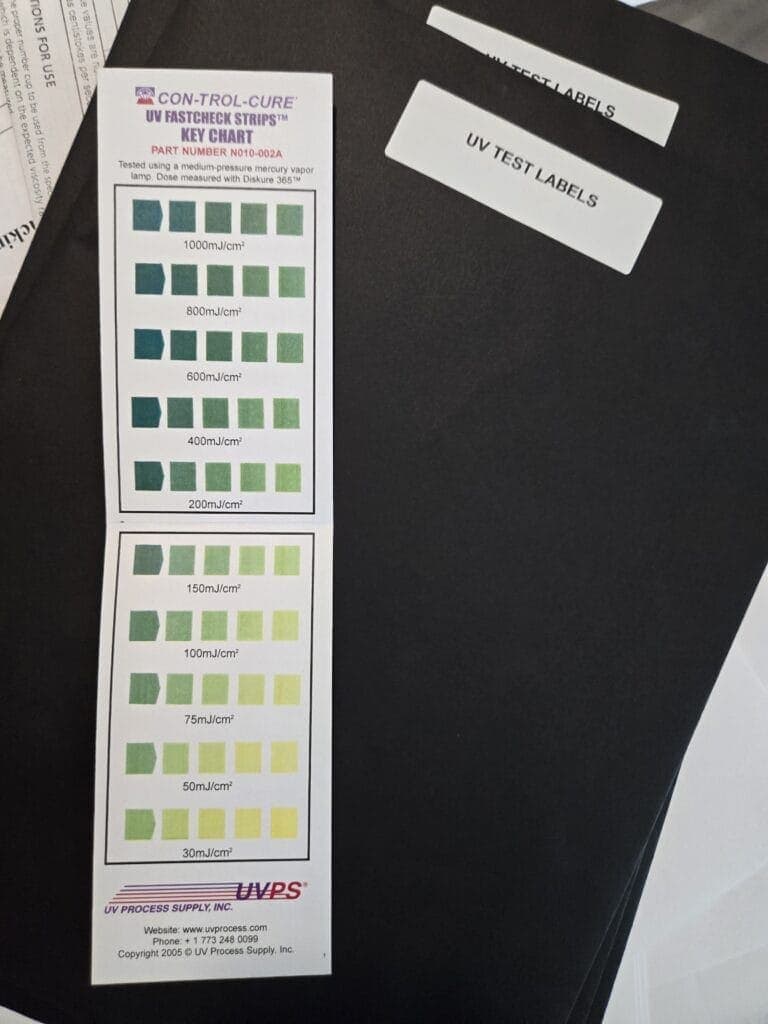
Using UV Test Labels to Optimize Your Curing System
UV test labels are a handy tool to ensure your UV curing system is operating properly and delivering consistent results. Here’s how to use them effectively:

  1. Setting the Baseline (Good Cure):

Dial in your system: Start by setting your UV curing system to a known speed and intensity that you’re confident delivers proper curing.
Apply the label: Stick a UV test label onto a representative material that will be passing through your curing system during regular operation.
Run the test: Pass the material with the label through the curing system. This labeled material becomes your reference point for a “good” cure.

  1. Monitoring for Undercure:

Incremental adjustments: Gradually increase the line speed of your curing system in small increments.
Observe the results: As the line speed increases, monitor the curing characteristics of the materials passing through.
Identify undercure: When you notice signs of undercure (incomplete or uneven curing), pass another UV test label through the system at this speed. This labeled material becomes your reference point for a “bad” cure.

  1. Establishing the Minimum Effective Dose:

Slow down and observe: Starting from the speed that resulted in undercure, gradually decrease the line speed.
Monitor color change: Pass UV test labels through the system at these slower speeds. Look for a noticeable color change on the label.
Minimum effective cure: The speed at which the label shows a color change represents the minimum effective dose for your curing system. At this point, the system is still curing effectively, but it’s approaching a threshold where maintenance might be necessary to maintain optimal performance.
By following these steps and keeping your reference labels (good cure, bad cure, minimum cure), you can monitor your UV curing system’s performance over time and make adjustments as needed. Remember to consult the specific instructions provided by the manufacturer of your UV curing system and the UV test labels for the most accurate results.


Share Post
  • Twitter
  • Facebook
  • VK
  • Pinterest
  • Mail to friend
  • Linkedin
  • Whatsapp
  • Skype
Colorstrology – By Miche...
The benefits of using surface ...

About author

About Author

Juan Rincon

Other posts by Juan Rincon

Related posts

40 Dynes—But Relative to What Ink?

August 1, 2026
  40 Dynes—But Relative to What Ink? Ink technical data sheets commonly specify that a substrate must reach 38, 40, 42, or even 44 dyn/cm... Continue reading

Why Do UV-A Intensity Labels Change Color?

July 31, 2026
UV-A intensity labels provide a simple visual indication of UV-A exposure. But what actually causes the color change? The answer is a photoresponsive chemical reaction... Continue reading

Can One UV Lamp Cure Everything?

July 30, 2026
Can One UV Lamp Cure Everything?The Short Answer: No. Complete Guide to UV Curing – Chapter 2    If every UV lamp produces ultraviolet light,... Continue reading

What UV lamp is installed on your press?

July 23, 2026
Do You Really Know the UV Lamp You’re Using Every Day? While designing a baseline verification and monitoring chart for UV systems, a simple question... Continue reading

UV-A Intensity Labels – 110 Color-Changing Exposure…

July 18, 2026
Most UV indicators on the market only have one color scale. Kolorguide UV Tests, on the other hand, include two distinct scales: H-BULB (Mercury) D-BULB... Continue reading

Comments are closed

Search

Recent Posts

  • WHEN NOT TO BUY DYNE TEST PENS September 7, 2026
  • “THAT’S NOT THE COLOR I APPROVED.” August 27, 2026
  • Cuando la impresión falla, ¿dónde debemos buscar? August 25, 2026
  • When Printing Fails, Where Should You Look? August 25, 2026
  • ¿Qué significa realmente tratar correctamente una superficie de aluminio? August 17, 2026

Categories

  • Books
  • Color Guide
  • Color Of the Day
  • Digital
  • Flexographic
  • Graphic Design
  • Lab & Quality control
  • Laboratorio y control de calidad
  • Munsell Color System
  • polymer science books
  • Printing
  • Rules, regulations and standards
  • Uncategorized
+1(561) 382-7278
info@kolorguide.com

COMPANY POLICIES

Privacy Policy
Terms and conditions of use

MENU

Home
Shop
About us
Blog
Contact us
Surface Energy & Viscosity Testing Standards (ASTM D4212 & ISO 8296)

PAYMENT SECURITY

Encryption ensures increased transaction security. SSL technology protects data linked to personal and payment info.

Kolorguide Logo
Cookie Preferences
We use cookies and similar technologies to improve website functionality, analyze traffic, and support marketing activities. You can accept all cookies, deny non-essential cookies, or manage your preferences.
Functional Always active
The technical storage or access is strictly necessary for the legitimate purpose of enabling the use of a specific service explicitly requested by the subscriber or user, or for the sole purpose of carrying out the transmission of a communication over an electronic communications network.
Preferences
The technical storage or access is necessary for the legitimate purpose of storing preferences that are not requested by the subscriber or user.
Statistics
The technical storage or access that is used exclusively for statistical purposes. The technical storage or access that is used exclusively for anonymous statistical purposes. Without a subpoena, voluntary compliance on the part of your Internet Service Provider, or additional records from a third party, information stored or retrieved for this purpose alone cannot usually be used to identify you.
Marketing
The technical storage or access is required to create user profiles to send advertising, or to track the user on a website or across several websites for similar marketing purposes.
  • Manage options
  • Manage services
  • Manage {vendor_count} vendors
  • Read more about these purposes
View preferences
  • {title}
  • {title}
  • {title}